Orderflows
New member
https://www.orderflows.com/pressure/
Built for Serious Traders
 Pressure Sensitivity Levels
Adjust 1st and 2nd level Buy/Sell Pressure thresholds to control signal sensitivity. Filter out noise or catch every micro-signal.
 Trade Entry Signal
Enable confirmation mode: signals only print when the next bar shows follow-through order flow. Keeps you out of bad trades with no confirming price action.
 Momentum Strength Filter
Trade in the direction of momentum. Set from 0 (all signals) to 6 (strongest momentum only). Default of 3 gives balanced filtering.
 POC Filter
When enabled, validates that the Point of Control supports the signal. Remember, POC acts as support in up candles, resistance in down candles.
Δ Delta Confirmation & Divergence
Confirm signals with delta (positive delta for buys, negative for sells) or look for divergence setups where delta opposes the move.
 Visual Signal Zones
Draw defended zones on your chart with adjustable height, width, opacity, and draw modes (fixed or until tested). See exactly where passive traders showed up.
POC Movement
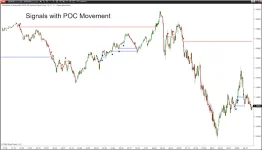
Tracks POC Movement in the bars. POC represents the price levels with the most volume and it is proven that in strong moves, POC moves with price.
Multi-Time Frame Analysis
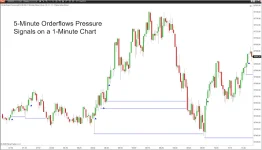
Analyze higher or lower time frames and plot the signals on your existing chart. Now you can plot signals from higher time frames like 5-minutes and plot them on your 1-minute chart.
What You Get
Orderflows Pressure Indicator for NinjaTrader 8—the complete indicator with all settings, filters, and visual customization options.
Trade Entry Signal System—built-in confirmation mode that only signals when follow-through order flow validates the setup.
Adjustable Pressure Sensitivity—1st and 2nd level thresholds for Buy and Sell Pressure so you can tune signal frequency to your style.
Momentum Strength Filter—trade with the momentum or see all signals. Adjustable from 0 to 6.
POC Filter—validates signals against the Point of Control position for added structural confirmation.
Delta Confirmation & Delta Divergence modes—two distinct ways to integrate delta into your Pressure signals.
Visual Signal Zones—automatically drawn defended zones on your chart with full customization (height, width, opacity, draw mode).
Swing Filter—analyze longer swing periods (1, 3, 5, or 10 bars) for different trading timeframes.
Multi-Time-Frame Analysis - Analyze higher or lower time frames on your existing chart.
POC Movement - Track the movement of POC, the heaviest volume traded in a bar, together with price.
Complete User Guide (48 slides)—full walkthrough of every setting, every application, and how to integrate Pressure into your trading.
Personal License Token—delivered via email. Plug it in and start using Pressure immediately.
5 Ways Pressure Gives You an Edge
1. Identify Reversals at Swing Highs and Lows
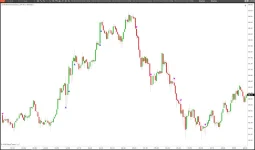
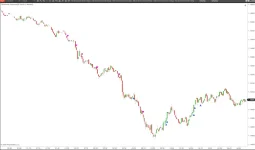
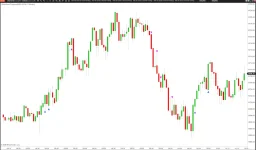
When price makes a swing low and Buy Pressure fires, passive buyers are defending. When price makes a swing high and Sell Pressure fires, passive sellers are capping. You see the turning point as it forms—not after the fact. Enter in the direction of the reversal with your stop beyond the defended zone.2. Discover Defended Price Levels
Every Pressure signal marks a level that is being actively defended. Mark it. When price returns, watch for renewed Pressure. If the passive participants show up again, the level remains defended. If they don’t, the defense has been abandoned—which is equally valuable information.3. Confirm Breakouts vs. Fakeouts
Price breaks above resistance. Is it real? If there’s no Sell Pressure above—no passive sellers defending—the breakout is likely genuine. But if Sell Pressure fires immediately above the breakout level, it’s being rejected. Walk away.4. Manage Trades and Time Exits
Already in a trade? Pressure tells you whether to hold or fold. You’re long and Buy Pressure appears below your entry? The position is being supported—hold with confidence. But Sell Pressure appears above? Tighten your stop or take profits.5. Read the Internal Dynamics of a Move
During a trending move, Pressure detects brief pockets of opposition. A pocket of Buy Pressure during a selloff creates a bounce—is it a reversal or a re-entry? A pocket of Sell Pressure during a rally creates a pause—is it distribution or consolidation? Pressure helps you answer these questions in real time.Built for Serious Traders
Powerful Settings, Complete Control
View hidden content is available for registered users!
Pressure Sensitivity LevelsAdjust 1st and 2nd level Buy/Sell Pressure thresholds to control signal sensitivity. Filter out noise or catch every micro-signal.
Trade Entry SignalEnable confirmation mode: signals only print when the next bar shows follow-through order flow. Keeps you out of bad trades with no confirming price action.
Momentum Strength FilterTrade in the direction of momentum. Set from 0 (all signals) to 6 (strongest momentum only). Default of 3 gives balanced filtering.
POC FilterWhen enabled, validates that the Point of Control supports the signal. Remember, POC acts as support in up candles, resistance in down candles.
Δ Delta Confirmation & Divergence
Confirm signals with delta (positive delta for buys, negative for sells) or look for divergence setups where delta opposes the move.
Visual Signal ZonesDraw defended zones on your chart with adjustable height, width, opacity, and draw modes (fixed or until tested). See exactly where passive traders showed up.
POC Movement
Tracks POC Movement in the bars. POC represents the price levels with the most volume and it is proven that in strong moves, POC moves with price.
Multi-Time Frame Analysis
Analyze higher or lower time frames and plot the signals on your existing chart. Now you can plot signals from higher time frames like 5-minutes and plot them on your 1-minute chart.
What You Get
Orderflows Pressure Indicator for NinjaTrader 8—the complete indicator with all settings, filters, and visual customization options.
Trade Entry Signal System—built-in confirmation mode that only signals when follow-through order flow validates the setup.
Adjustable Pressure Sensitivity—1st and 2nd level thresholds for Buy and Sell Pressure so you can tune signal frequency to your style.
Momentum Strength Filter—trade with the momentum or see all signals. Adjustable from 0 to 6.
POC Filter—validates signals against the Point of Control position for added structural confirmation.
Delta Confirmation & Delta Divergence modes—two distinct ways to integrate delta into your Pressure signals.
Visual Signal Zones—automatically drawn defended zones on your chart with full customization (height, width, opacity, draw mode).
Swing Filter—analyze longer swing periods (1, 3, 5, or 10 bars) for different trading timeframes.
Multi-Time-Frame Analysis - Analyze higher or lower time frames on your existing chart.
POC Movement - Track the movement of POC, the heaviest volume traded in a bar, together with price.
Complete User Guide (48 slides)—full walkthrough of every setting, every application, and how to integrate Pressure into your trading.
Personal License Token—delivered via email. Plug it in and start using Pressure immediately.