

EA Foundation Advisor V4.6 MT5
FOUNDATION Advisor is a new generation of tools designed for traders who prefer intraday and swing trading , with individual trade management and clearly defined exit points.
,43 modules. One diagram.
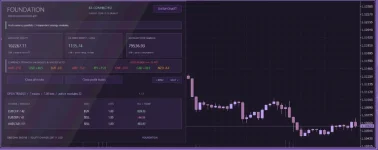
FOUNDATION is a multicurrency advisor for MetaTrader 5 that combines 43 independent modules into two groups: Normal TP and Bigger TP .
The default configuration of Normal TP covers 11 currency pairs; both groups together cover 16.
Each module has its own admission rules and only one vacancy is considered at a time.
 Without DCA
There is no recovery network
There is no martingale multiplication.
Individual stop losses and take profits on the broker's side
Group switches and independent ON/OFF switches for all 43 modules.
Different modules can simultaneously trade the same currency pair if the pair limit is not enabled. *An unprofitable transaction does not lead to the opening of additional recovery positions with this module.
 CREATED FOR INTRADAY AND SWING TRADING
When both groups are enabled, FOUNDATION tracks opportunities for 16 Forex currency pairs.:
AUDCAD · AUDJPY · AUDUSD · CADJPY · EURAUD · EURCAD · EURCHF · EURGBP · EURJPY · EURUSD · GBPAUD · NZDJPY · NZDUSD · USDCAD · USDCHF · USDJPY
Some positions are closed during the trading day; others remain open for several trading sessions. Each module uses its own internally configured timeframe, so one main chart is sufficient.
 Standard TP: 22 modules for 11 currency pairs, enabled by default. This is our main configuration for long-term use.
TP increase: 21 additional modules disabled by default. This optional group is intended for traders who prefer higher profit targets.
FOUNDATION Advisor is a new generation of tools designed for traders who prefer intraday and swing trading , with individual trade management and clearly defined exit points.
,43 modules. One diagram.
FOUNDATION is a multicurrency advisor for MetaTrader 5 that combines 43 independent modules into two groups: Normal TP and Bigger TP .
The default configuration of Normal TP covers 11 currency pairs; both groups together cover 16.
Each module has its own admission rules and only one vacancy is considered at a time.
Without DCAThere is no recovery networkThere is no martingale multiplication.Individual stop losses and take profits on the broker's sideGroup switches and independent ON/OFF switches for all 43 modules.Different modules can simultaneously trade the same currency pair if the pair limit is not enabled. *An unprofitable transaction does not lead to the opening of additional recovery positions with this module.CREATED FOR INTRADAY AND SWING TRADINGWhen both groups are enabled, FOUNDATION tracks opportunities for 16 Forex currency pairs.:
AUDCAD · AUDJPY · AUDUSD · CADJPY · EURAUD · EURCAD · EURCHF · EURGBP · EURJPY · EURUSD · GBPAUD · NZDJPY · NZDUSD · USDCAD · USDCHF · USDJPY
Some positions are closed during the trading day; others remain open for several trading sessions. Each module uses its own internally configured timeframe, so one main chart is sufficient.
Standard TP: 22 modules for 11 currency pairs, enabled by default. This is our main configuration for long-term use.TP increase: 21 additional modules disabled by default. This optional group is intended for traders who prefer higher profit targets.Each group has a main switch, and each module has its own switch. Disabling a group or module stops adding new entries, while managing existing FOUNDATION positions continues.
good results when using a broker www.fxpro.com
Download
View hidden content is available for registered users!

